





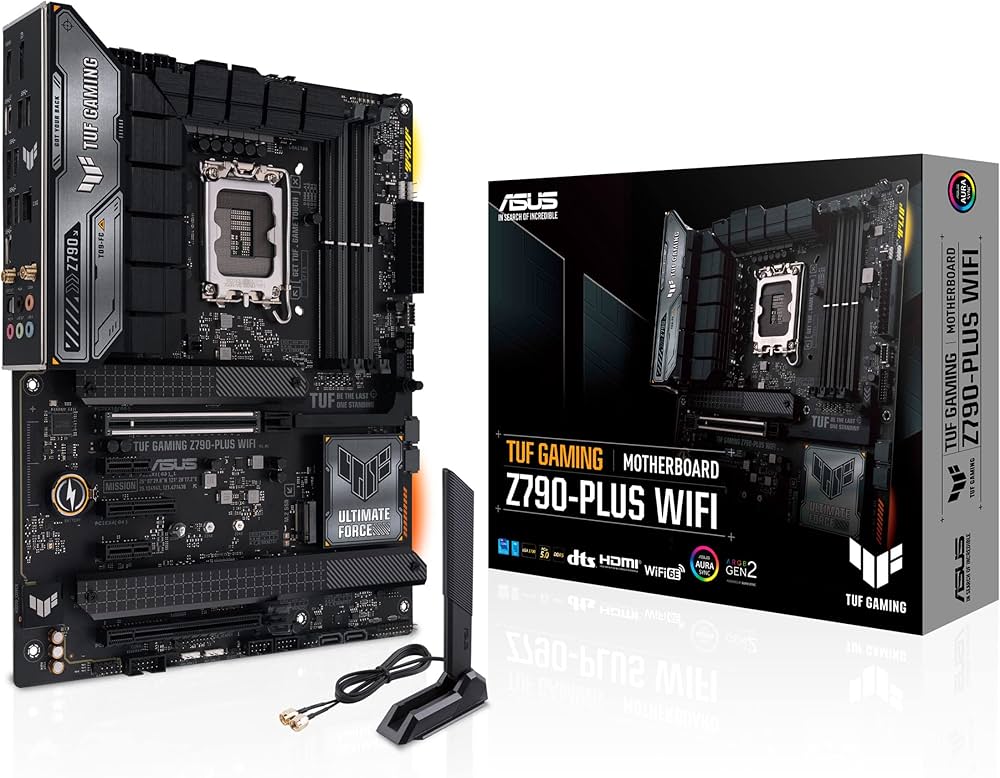



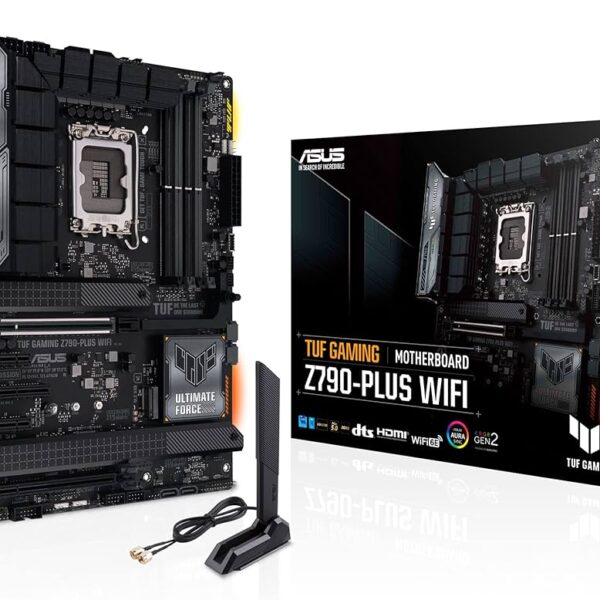
ASUS TUF Gaming Z790-Plus WiFi D4 ATX Motherboard
PCIe 5.0 and Next-Generation Connectivity: Prepare your system for the future of graphics. This motherboard features a reinforced PCIe 5.0 x16 SafeSlot, providing absolutely massive bandwidth for the newest and upcoming flagship graphics cards. Additionally, it offers incredible data transfer speeds with a rear USB 3.2 Gen 2×2 Type-C port, a front-panel USB 3.2 Gen 2 Type-C header, and native Thunderbolt 4 header support, ensuring you can connect ultra-fast external storage without any bottlenecks.
Cost-Effective DDR4 Performance: You do not have to buy expensive new memory to build a high-end Intel Z790 system. This “D4” version of the motherboard specifically utilizes the DDR4 memory standard. This allows you to carry over your existing high-speed DDR4 RAM from an older computer, saving you a significant amount of money while still utilizing the absolute newest 13th and 14th Gen Intel Core processors. Using ASUS OptiMem II technology, it can push premium DDR4 kits to massive overclocking speeds up to 5333 MHz.
Elite Power and Thermal Desig: High-core-count Intel processors require incredibly stable power. The TUF Z790-Plus is equipped with a heavy-duty 16+1 DrMOS power stage system built on a thick, six-layer PCB to guarantee flawlessly clean electricity delivery. To prevent any thermal throttling during heavy workloads, it features massive, enlarged VRM heatsinks. Furthermore, three out of the four onboard M.2 storage slots include dedicated metal heatsinks to keep your high-speed NVMe solid-state drives perfectly cool during intense data transfers.
Key Features
LGA 1700 Socket: Fully compatible out of the box with the powerful Intel 12th, 13th, and 14th Generation desktop processors.
PCIe 5.0 SafeSlot: A heavily reinforced primary slot provides maximum bandwidth for next-generation flagship graphics cards.
DDR4 Memory Support: Retains compatibility with affordable DDR4 memory, allowing for massive memory capacities up to 128 Gigabytes.
Four M.2 Storage Slots: Provides enormous high-speed storage potential, supporting fast PCIe 4.0 NVMe solid-state drives.
Wi-Fi 6 and 2.5G LAN: Next-generation wireless and wired networking ensures ultra-smooth online gaming and rapid file downloads.
PCIe Q-Release: A physical button allows you to instantly and safely unlatch heavy graphics cards without trying to squeeze your fingers under the heatsink.
Specifications of ASUS TUF Gaming Z790-Plus WiFi D4 ATX Motherboard
Model: ASUS TUF Gaming Z790-Plus WiFi D4
Socket: Intel LGA 1700
Chipset: Intel Z790
Form Factor: ATX
Memory Support: 4 x DDR4 DIMM Slots (Up to 128 Gigabytes)
Storage Slots: 4 x M.2 PCIe 4.0 slots and 4 x SATA ports
Networking: Wi-Fi 6, Bluetooth 5.2, and Intel 2.5Gb Ethernet
Who It Is For
Value-Conscious Upgraders: PC builders who want to upgrade to a brand new 14th Gen Intel processor but want to save money by reusing their existing DDR4 memory kit.
Heavy Gamers: Players who demand rock-solid stability during marathon gaming sessions and need massive power delivery for high-end Core i7 or Core i9 CPUs.
Storage Enthusiasts: Creators and gamers with massive file libraries who absolutely need the ability to install up to four ultra-fast M.2 solid-state drives natively on the motherboard.
Frequently Asked Questions
Can I install DDR5 memory into this motherboard? No, absolutely not. This specific model is the “D4” edition, meaning it is strictly built for DDR4 memory only. The physical slots on the board will not accept DDR5 memory sticks. If you specifically want to use DDR5 memory, you must purchase the standard, non-D4 version of the ASUS TUF Z790-Plus.
Does this motherboard support the new PCIe 5.0 M.2 storage drives? No. While the primary graphics card slot is PCIe 5.0, all four of the M.2 storage slots operate on the PCIe 4.0 standard. You can still plug a PCIe 5.0 drive into these slots, but it will automatically slow down and operate at PCIe 4.0 speeds.
Does this board have an integrated I/O shield? Yes. The stainless steel rear input/output shield is permanently pre-mounted to the motherboard at the factory. This completely eliminates the incredibly frustrating step of trying to snap a sharp, separate metal shield into your computer case before installing the board.

Reviews
Clear filtersThere are no reviews yet.