


How to Choose the Right Motherboard for Your PC Build

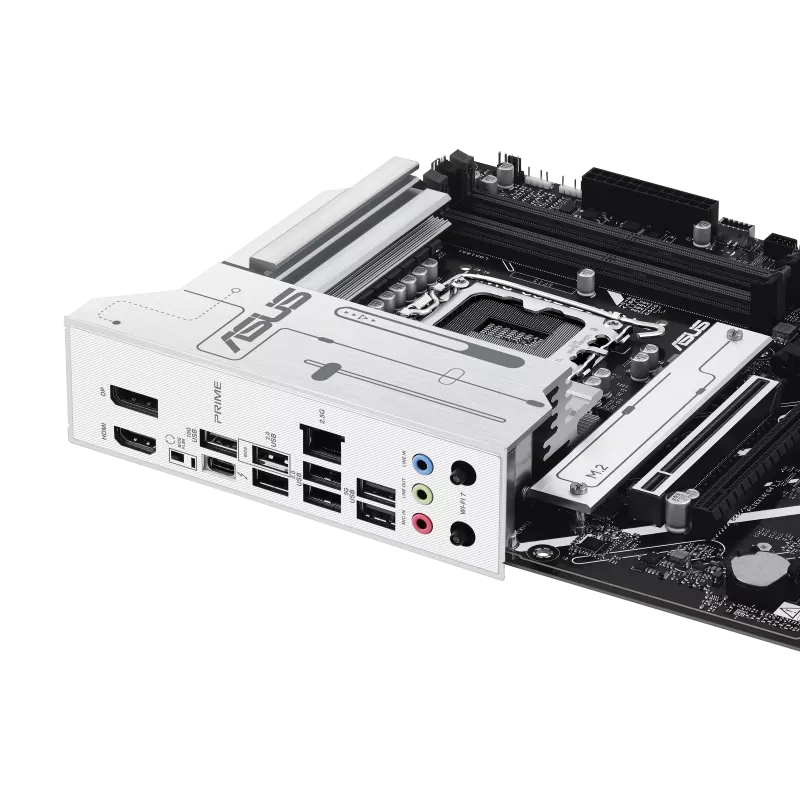
Building or upgrading a computer requires careful consideration of every component, and the motherboard is one of the most important parts of the system. It connects essential components such as the processor, RAM, graphics card, storage drives and other peripherals. Choosing the right motherboard can improve compatibility, connectivity and the overall upgrade potential of your PC.
Whether you are building a gaming computer, office PC or high-performance workstation, understanding motherboard specifications can help you make a more informed decision.
What Is a Motherboard?
A motherboard is the main circuit board inside a computer. It provides connections between the processor, memory, storage, graphics card and other hardware.
Different motherboards are designed for different processors and use specific chipsets and CPU sockets. Therefore, motherboard compatibility should always be checked before purchasing a processor or other components.
1. Check Processor Compatibility
The first step when selecting a motherboard is to determine which processor you plan to use. AMD and Intel processors use different platforms, and even processors from the same manufacturer may require different sockets or chipsets.
For example, before buying a motherboard, check whether it supports your selected processor and whether a BIOS update is required.
If you already own a processor, start your motherboard search by identifying its compatible socket and chipset. This can significantly narrow down your options.
2. Choose the Right Chipset
The chipset determines many of the features and connectivity options available on a motherboard. Different chipsets may provide different numbers of PCIe lanes, USB ports, storage connections and overclocking capabilities.
For a basic computer, you may not need an expensive high-end chipset. However, gaming computers and professional workstations may benefit from motherboards offering additional expansion and connectivity features.
Always compare the chipset specifications with your intended PC usage before making a purchase.
3. Consider RAM Compatibility
RAM is another important consideration. Modern motherboards can support different memory standards, including DDR4 and DDR5, depending on the platform.
Check the motherboard’s supported RAM type, maximum capacity and supported memory speeds. Also consider how many RAM slots are available.
If you expect to upgrade your computer later, choosing a motherboard with additional RAM slots can provide greater flexibility.
4. Look at Expansion Slots
If you are building a gaming computer, pay attention to the motherboard’s expansion slots. A PCIe x16 slot is commonly used for a dedicated graphics card.
You may also need additional PCIe slots for expansion cards such as Wi-Fi adapters, capture cards or other specialized hardware.
Before purchasing, consider which components you currently need and whether you might add more in the future.
5. Check Storage Support
Modern computers commonly use NVMe SSDs for fast storage. Many motherboards include M.2 slots that allow users to install NVMe SSDs directly onto the motherboard.
Check how many M.2 slots are available and which PCIe generation they support. SATA ports may also be important if you plan to use traditional SATA SSDs or hard drives.
A motherboard with multiple storage options can be useful for users who need additional capacity.
6. Consider Connectivity
Connectivity is another factor that should not be overlooked. Depending on your requirements, you may want USB-A, USB-C, Ethernet, audio connections, Wi-Fi and Bluetooth.
Gamers and content creators may need several USB ports for keyboards, mice, external storage, microphones and other accessories.
If you prefer wireless networking, consider a motherboard with built-in Wi-Fi and Bluetooth rather than purchasing separate expansion cards.
7. Select the Appropriate Motherboard Size
Motherboards are available in different form factors, including ATX, Micro-ATX and Mini-ITX.
ATX motherboards generally provide more expansion slots and connectivity, while Micro-ATX models can be suitable for smaller PC builds. Mini-ITX motherboards are designed for compact computers.
Make sure the motherboard size is compatible with your computer case.
8. Think About Future Upgrades
A good motherboard should match both your current requirements and your potential future upgrades.
If you plan to add more RAM, storage, a better graphics card or additional expansion hardware later, check whether the motherboard has sufficient slots and supported features.
Spending a little more on useful features can sometimes make future upgrades easier.
Why Buy Motherboards from a Reliable Retailer?
When purchasing computer components, product authenticity, compatibility and warranty support are important considerations. A reliable retailer can help customers find suitable motherboards, processors, memory and other computers components based on their requirements.
Avika Retails offers a range of computer hardware products, making it easier to explore different motherboard options for gaming, office and high-performance PC builds.
Conclusion
Choosing the right motherboard is about more than simply selecting the most expensive model. Consider your processor, RAM, graphics card, storage requirements, expansion needs, connectivity and future upgrade plans.
By checking compatibility before purchasing, you can build a computer that works reliably and provides room for future upgrades. Whether you are upgrading an existing system or building a new PC from scratch, selecting the appropriate motherboard is an important step toward creating a balanced computer.
FAQs
1. What is the most important factor when choosing a motherboard?
Processor compatibility is one of the first things to check. The motherboard must support your processor’s socket and platform.
2. Can any processor work with any motherboard?
No. Processors are compatible only with specific motherboard sockets and supported chipsets. Always check manufacturer compatibility information.
3. Should I choose DDR4 or DDR5 motherboard?
It depends on your processor platform, budget and performance requirements. Check which memory standard your selected processor and motherboard support.
4. How many RAM slots should a motherboard have?
For most users, two or four RAM slots are sufficient. Four slots can provide more flexibility for future memory upgrades.
5. Is an ATX motherboard better than Micro-ATX?
Neither is universally better. ATX generally offers more expansion options, while Micro-ATX can provide a more compact and cost-effective PC build.
6. Do motherboards come with Wi-Fi?
Some motherboards include built-in Wi-Fi and Bluetooth, while others require separate adapters or expansion cards. Check the specifications before buying.
7. Can I upgrade my motherboard later?
Yes, but changing a motherboard can sometimes require checking compatibility with the processor, RAM, case and other components. Planning your platform carefully can make future upgrades easier.